Branching Strategy
 Edit on GitHub
Gitflow
Overview
Gitflow Workflow is a Git workflow design that was first published and made popular by Vincent Driessen at nvie. The Gitflow Workflow defines a strict branching model designed around the project release. This provides a robust framework for managing larger projects.
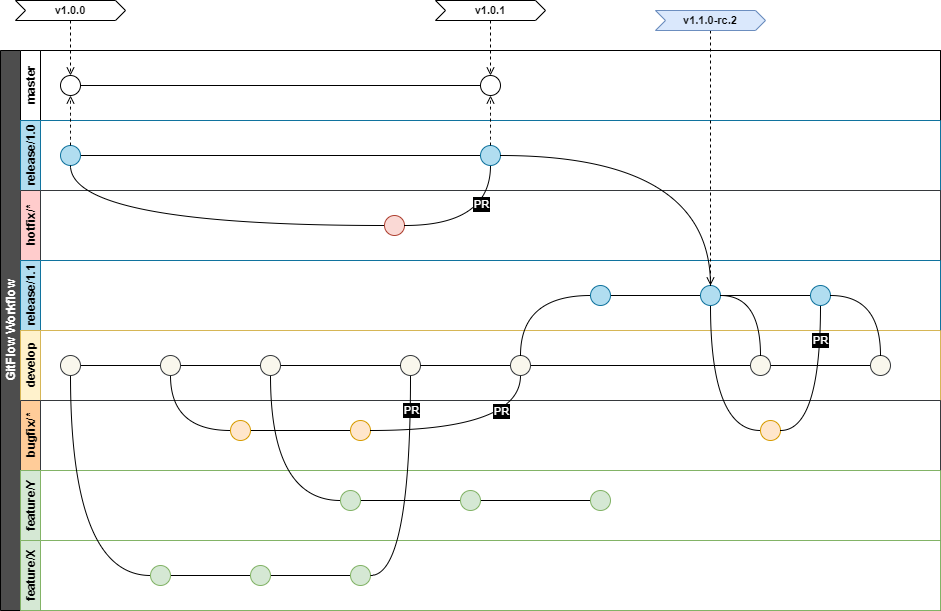
GitFlow is taken as a basis for the branching strategy. However, a few modifications are done in order to accommodate a support of multiple releases deployed simultaneously to different environments. A decoupling of CI and CD processes via artifacts repository also affects the process.
Key principles
- GIT must have enough meta information to trace issues and artifacts from other enterprise tools leveraged in SDLC.
- GIT is not a primary tool for issue tracking, but JIRA issues must be traceable back to a specific commit.
- GIT is not a primary tool for release management, but build artifacts and installed applications must be traceable back to a specific commit and tag.
Types of Branches
| Branch | Description | Lifetime | Examples |
|---|---|---|---|
| develop | Reflects a state with the latest delivered development changes for the next release. Sometimes called this the "integration branch". This is where any automatic nightly builds are built from. | Permanent | develop |
| master | Usually this branch reflects a production-ready state. After code has been validated in a release branch and pushed to production, the code is merged to the master branch. However, this doesn't fully align with multiple releases installed concurrently on different environments. | Permanent | master |
| feature/{TICKET_KEY}-{short description [0-9A-Za-z-]*} | Feature branches (or sometimes called topic branches) are used to develop new features for the upcoming or a distant future release. The essence of a feature branch is that it exists as long as the feature is in development, but will eventually be merged back into develop (to definitely add the new feature to the upcoming release) or discarded (in case of a disappointing experiment). | Short-term | feature/US-101-cdnintegration |
| release/{major}.{minor} | The key moment to branch off a new release branch from develop is when develop (almost) reflects the desired state of the new release. At least all features that are targeted for the release-to-be-built must be merged in to develop at this point in time. All features targeted at future releases may not—they must wait until after the release branch is branched off. Semi-permanent lifetime means that release branch can leave as long as artifacts created from this version are deployed on some environment. | Long running | release/2.1 release/3.7 |
| bugfix/{TICKET_KEY}-{short description [0-9A-Za-z-]*} | Bugfix branches are similar to feature branches, but created not to create a new feature but to fix an issue in develop or release/*. | Short-term | bugfix/DE-10-fix-markup |
| hotfix/{TICKET_KEY}-{short description [0-9A-Za-z-]*} | Hotfix branches are similar to bugfix branches, but created from release branches and intended to fix issues in them once the release is already in PROD. | Short-term | hotfix/DE-11-fix-markup |
Process Guidelines
- Active development happening in
develop - Commits should not be pushed directly to permanent or long-running branches at any time. Update of those branched is happening via
merge(squash) of afeature/bugfix/hotfixbranch. featureandbugfixbranches are created for tickets (User Stories or Bugs) that will be deployed individually.- PR should be merged into
developor correspondingreleasebranch in case ofhotfixes - PR for
featureorbugfixbranches are merged viasquashandrebaseto keep history clean and digestible. feature/bugfix/hotfixbranch should be removed after PR is merged.- Once something is merged into the
releasebranch, thisreleasebranch should be merged in all higherrelease/*anddevelop. - Once
release/*branch is created, any changes in this branch should be made with PR frombugfix/*orhotfix/*branches. ⚡ PR fromdevelopbranch torelease/*is prohibited!
⚠️ Note: There is a risk of associating a feature branch with a User Story. Some components may contain UI elements or functionality common for other User Stories. If such User Stories should be delivered in parallel, it's allowed to create a feature branch that related only to this part of the functionality. In this case a feature branch is considered as technical and should be ignored by QA team. This approach allows you quickly unblock the team and increase the overall velocity.
Branching and Artifacts Management
| Branch | Version Type | Artifacts Repository | Comments |
|---|---|---|---|
| develop | Snapshot Version | Snapshot repository | |
| master | n/a | n/a | * Artifacts should not be created directly from master branch, it is used only for tracking. |
| feature/* | n/a | n/a | * Artifacts might be saved into snapshot storage with once it will be possible to run ephemeral environments for branches. |
| release/* | Snapshot Version Release Version | Snapshot repository Release repository | Artifacts originally created in the Snapshot repository and promoted to the Release repository upon success validation. |
| bugfix/* | n/a | n/a | * Artifacts might be saved into snapshot storage with once it will be possible to run ephemeral environments for branches. |
| hotfix/* | n/a | n/a | * Artifacts might be saved into snapshot storage with once it will be possible to run ephemeral environments for branches. |
Build and deployment processes are separated via artifacts generation. Which mean that artifacts will be generated from a branch once but could be deployed to multiple environments without modification of a code.
Due to different level of readiness and stability of artifacts created from branches listed below artifacts of following types will be produced.
Mapping of Artifacts to Environments
Snapshot and Release repositories will have different deployment targets (see picture below):
- Snapshot could be deployed to DEV and them promoted to QA.
- Release artifacts can be installed on any environment from QA to PROD
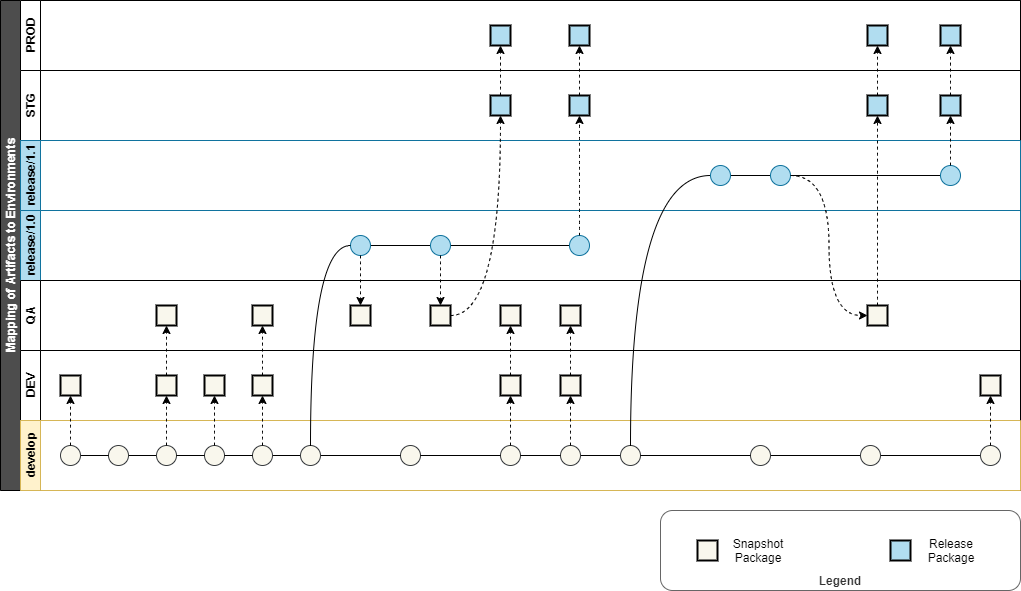
Artifacts are not created from a hotfix branches, but from a release branch once code review is passed and it is merged to release branch.
Mapping to Agile Development Process
Branching strategy should reflect development process. Following steps describe a process on a high level.
- At the very beginning of a sprint all development in done in
featurebranches and merged intodevelop. Each merge intodevelopresults into a deployment of asnapshot artifacttoDEVenvironment, if all validations are passed. - The
snapshot artifactcould be deployed toQAper QA team request. - It is expected to have a
feature freezecloser to the end of a sprint (2-3 days). At that point areleasebranch is created and all only only a bug fixes for previously finished features could be merged into a release branch. - After a feature freeze release artifacts ate deployed to
QAenvironment for final testing and regression. - Sprint Review (demo) is happening in
QAand a decision to promote toSTGfollows the demo. - Release to
PRODis done after all validation inSTGare passed and business approval received.
The picture below shows how branches are mapped to sprints.

GitFlow Modification
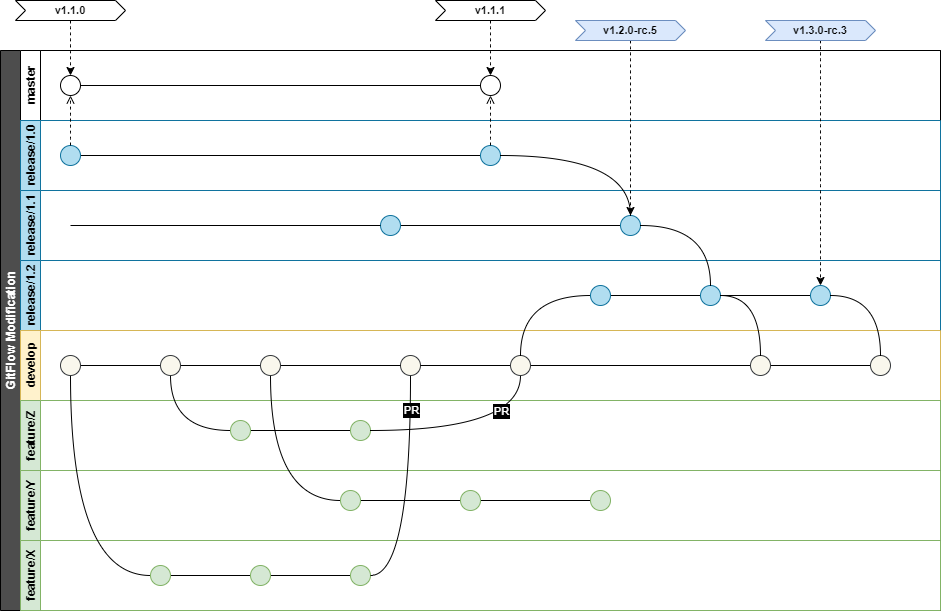
While GitFlow is widely popular, it is just a modification of a Feature Branch workflow that was designed to work with a specific release cycle (more details regarding different workflows).
There is no one size fits all Git workflow, and it’s important to develop a Git workflow that is a productivity enhancement for your team. In addition to team culture, a workflow should also complement business culture and release strategy.
Issues
- GitFlow assumes release turn around cycle is fast and there is only one production version at any point of time. It is common situations when different releases are deployed to different environments.
- Current DevOps process does not designate specific branch to every environment but rather use artifacts storage for release artifacts. This means that release is created once and has a separate workflow from GIT at that point. It can be multiple times or in different environments. It is important to mention that the release artifact should have meta-information about its origin (branch, commit, version). Merge to master after release generates different commit hash and complicates further identification of a code change.
- Any change to a code base supposed to pass code review (via PR) this mean that no changes should be made directly to release or develop branch. Code review is not addressed in GitFlow at all.
- Tagging on a master branch (especially with merge commits) doesn't allow to identify current working version in other branches.
- GitFlow assumed that source control is used for release management, which might be right for smaller projects. However, in Toyota, there are dedicated tools to track the release process. Git is used only for a source code management. Multiple release branches
Multiple release branches
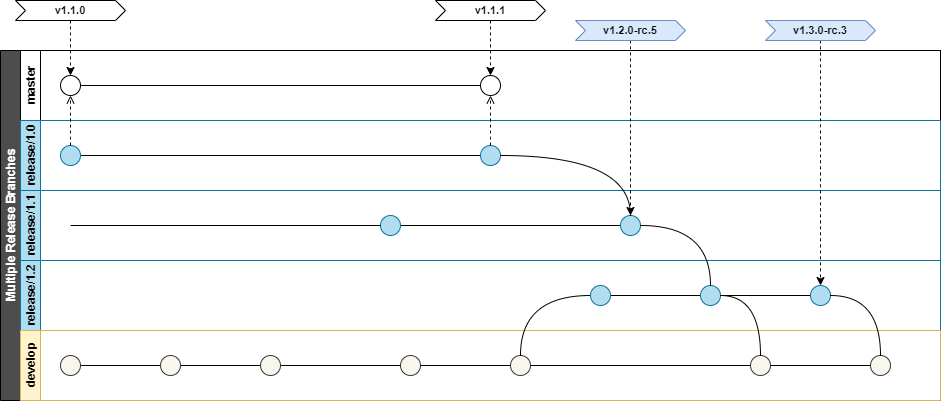
Taking on account that at any point in time you can have up to 3 different releases installed from QA to PROD, release branch is considered long-term (but not permanent). Release branch could be removed once the newer release is already moved to PROD and their prod sanity checks are passed. The process of release branches clean-up is manual. E.g., in a picture above, release branch number 0.9 can be decommissioned as PROD already has 1.0.
Master branch
Master branch is used only for reference of a code currently installed on PROD. No artifacts are created from the master branch
Artifacts tagging
Each successful build from a release branch supposes to create artifacts. Metadata in various forms must be applied to artifacts (e.g., part of naming, version file, package.json). The purpose of this metadata is to identify a code change in case of troubleshooting.
To ensure such traceability tags are applied to release branches as a part of CI/CD process. The master branch shares the same tag as it is reset to deployed commit.
Hotfix & bugfix branches
A branch is be called hotfix only if it is created for a version currently deployed to PROD. Bugfix branch is created in all other issue related cases. No branched should be created directly from the master, as this branch is only for reference. No fixes should be committed directly to a release branch.
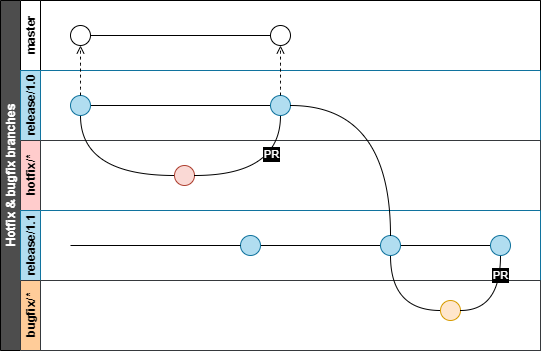
Both hotfix and bugfix branches are merged into a branch from where they were originated, then a release change propagation should be used afterward.
Release change propagation
Changes are always propagated from lower release number to upper, e.g., R1 to R2, R2 to R3, R3 to R4 and so on. The current production version is usually the lowest version to get change. Propagation process is not automated and it might have code conflicts and should be handled by a team.
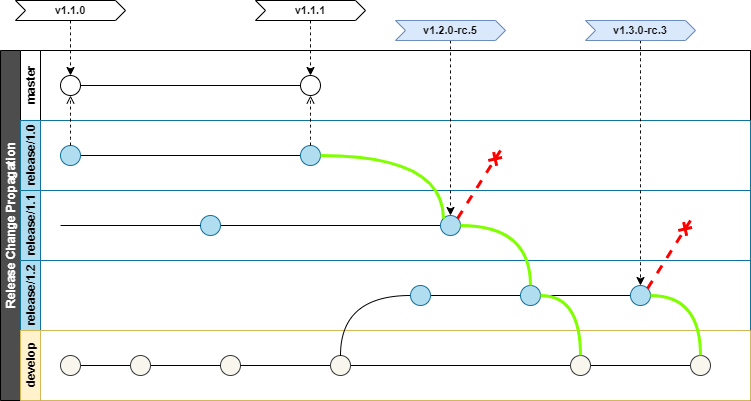
Pull (merge) request
Code review is an important part of a quality control. Every change in the develop and release branches should be reviewed before merging. GitFlow suggest to do minor fixes in release branch directly.
Source Code Tagging
Source code tags must be applied in alignment with versioning guidelines. Tags applied to a code base will ensure discoverability of changes.
Tag Types
Following types of tags are used in a source control system (GIT):
- Public version tag - to mark releases artifacts and provide version information for a build process (e.g., increment patch version)
- Private version tag - to mark commits that were used for a successfully created build artifact
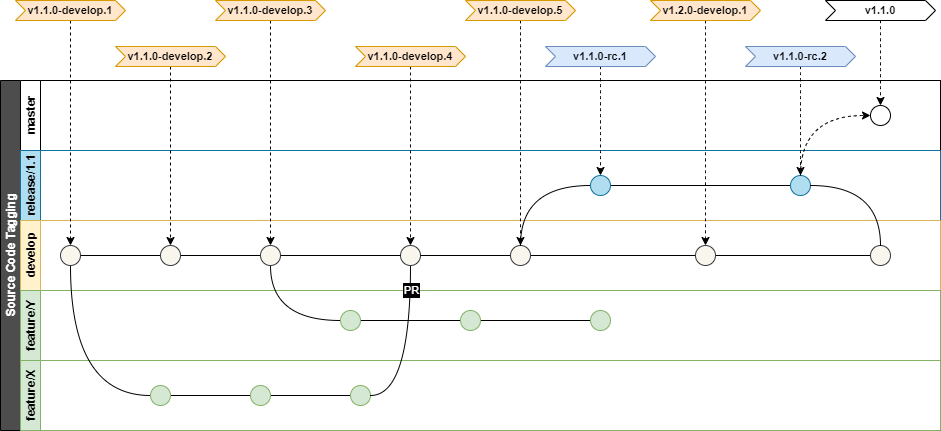
Public version tags
Public version tags are used to mark source control with information about released artifacts. Those tags should include full SemVer and applied to a commit SHA from an artifacts package metadata.
Following table describes those tags:
| Branch | Format | Example | Annotation Format | Description |
|---|---|---|---|---|
| master | v{SemVer} | v1.3.1 v2.0.0 | Auto-generated Release Tag Public version: {SemVer} | Placed automatically as one of the latest steps in release pipeline, after a successful release to PROD. Once the tag is placed it will bump up version for artifacts created after it. Public version tags must be annotated, otherwise git-describe won't be able to get them. |
Private version tags
Build server sets tags to GIT upon successful build in following branches:
| Branch | Format | Example | Comments |
|---|---|---|---|
| release/* | v{SemVer}-rc.{build #} | v1.3.0-rc.1 v1.3.1-rc.7 v1.4.0-rc.12 | Follows SEMVER format plus "rc" tag and a build number |
| develop | v{SEMVER}-develop.{build #} | v1.3.0-develop.179 v1.3.0-develop.180 | Follows SEMVER format plus "develop" tag and a build number |
Other branches do not trigger tag creation, as commits are be squashed upon PR merge.
Versioning Guidelines
A consistent versioning is a key to maintain high level of traceability of changes. Each artifact procured by a development team must be associated with a unique version.
All generated version must comply with SemVer standard.
Public vs. Private version
A public version is intended for external users and business communication. It could contain only major, minor and patch sections.
0.0.01.0.01.1.3
A private version is intended for internal use by a software development team to uniquely identify packages. It must start with the same major, minor and patch and can be extended with tag per SemVer format.
The tag should be aligned with branch name ("develop", or "rc" for release branch).
0.0.0-develop.123 // mapped to 0.0.0 public version1.0.0-rc.7 // mapped to 1.0.0 public version1.1.3-rc.26 // mapped to 1.1.3 public version